
Home/ Round management/ Scheduling
Scheduling
Window cleaning scheduling software
A round only works if every job lands on the right day, on its own, without you carrying the dates in your head. That's what MyRound's schedule does.
Jobs schedule themselves
Set a customer's frequency once — four-weekly, eight-weekly, one-off — and it's done. MyRound works out the next date every time a clean is marked complete, so nothing needs re-entering and nothing gets forgotten because you were busy on the day.
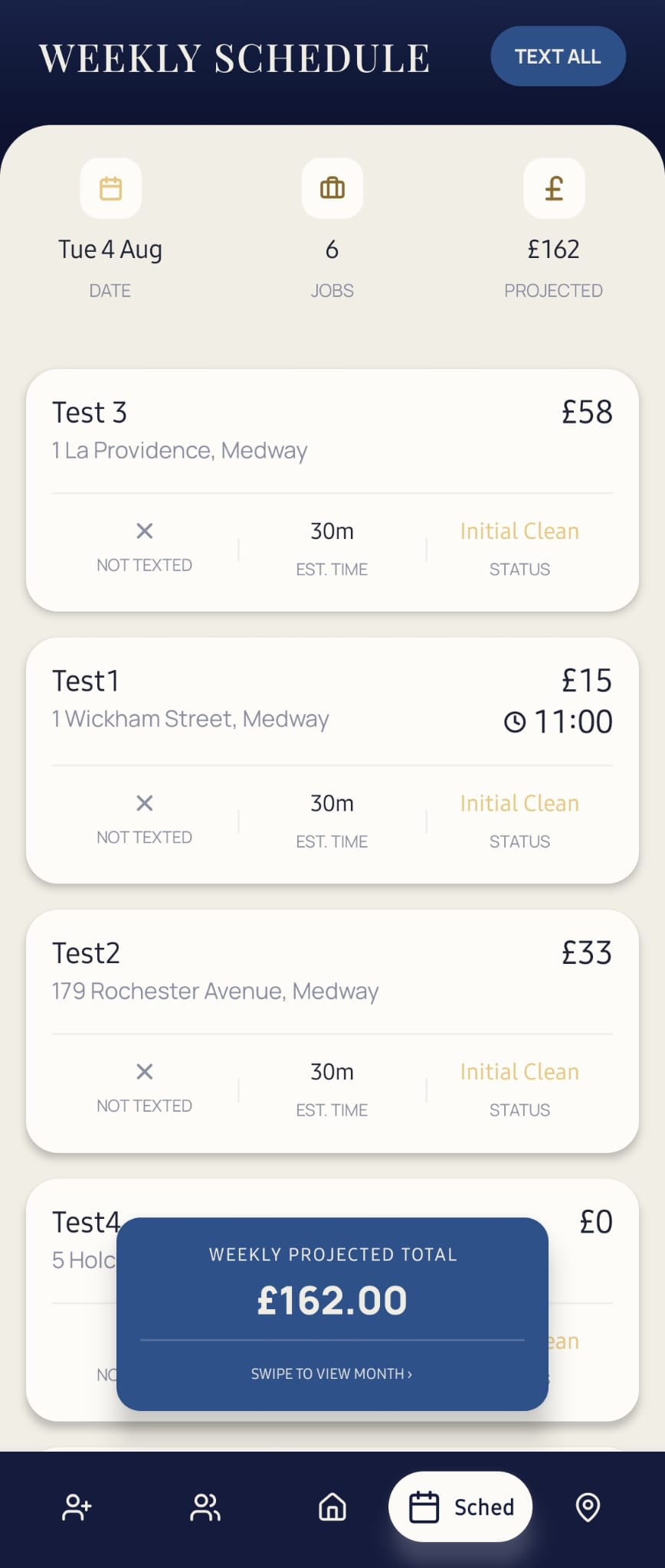
What happens when a day changes
Rain, a breakdown, a job that ran long — the day slips sometimes. Move a job in MyRound and it stays on your round instead of falling out of it. Text All sends the updated time straight to whoever's affected, from the same screen, so you're not doing it customer by customer from a separate messages app.
Knowing what's due, and what it's worth
The week shows the number of jobs and what they add up to before you've driven a mile. Initial cleans, priority jobs and standard rounds all sit in the same list, so there's one place to look — not a diary for one thing and a spreadsheet for another.
Four-weekly, eight-weekly, one-off — set once, not every visit
Most rounds run on a handful of frequencies, not one. A four-weekly customer and an eight-weekly customer sit on completely different clocks, and doing that by memory is exactly where a round starts slipping — someone gets missed a cycle, someone gets chased twice. MyRound reads the frequency off the customer record once, so a four-weekly clean and an eight-weekly clean both land on their own correct date without you doing the maths. One-off jobs — a one-time quote, a gutter clear, a first clean before a customer joins the round properly — sit in the same list without needing their own separate system.
The old way this replaces
Before a schedule like this, the usual setup is a diary or a spreadsheet with dates typed in by hand, or just knowing the round well enough to remember who's due. All three break the same way: they depend on you remembering to update them, and the day you're too busy to update it is the day someone gets missed. A missed clean on a four-weekly round doesn't just lose that one job — it pushes every date after it out of sync until you notice and fix it by hand. MyRound's schedule can't get out of sync like that, because the next date is worked out from the last completed clean, not typed in separately.
- Does MyRound handle irregular frequencies, not just weekly or monthly?
- Yes — four-weekly and eight-weekly are the two most common in window cleaning, and both are set per customer, not fixed sitewide. One-off jobs sit alongside recurring ones in the same schedule.
- What happens if I move a job to a different day?
- It stays on the round from its new date — nothing falls out of the schedule because it moved. Text All can notify the customer of the change from the same screen.
- Do I need to set reminders separately?
- No. The whole point of an automatic schedule is that there's nothing else to remember — the app tracks what's due, not you.
See it running on a real round
Free while MyRound is in beta — on iPhone and Android.
Part of running the whole round
- Window cleaning round management — how scheduling, routing and invoicing fit together
- Route planning — what happens to a scheduled job once it's due
- Invoicing — what happens once a scheduled job is done
- How to price a window cleaning round — working out what a frequency should cost